The thought went through my mind twice in the past weeks: how can I check on my clients and colleagues in Western North Carolina and Southern Florida in the wake of two powerful hurricanes and the ensuing flooding?
Or as a friend asked me, how can I find all the good people I know in (city/state} because I have some downtime there on a business trip?
Lightning strikes twice for varied reasons, but the same question, so worthy of answering here.
First I always see if I source the answer on LinkedIn’s Help function. Here’s a starting point: https://www.linkedin.com/help/linkedin/answer/a525054/.
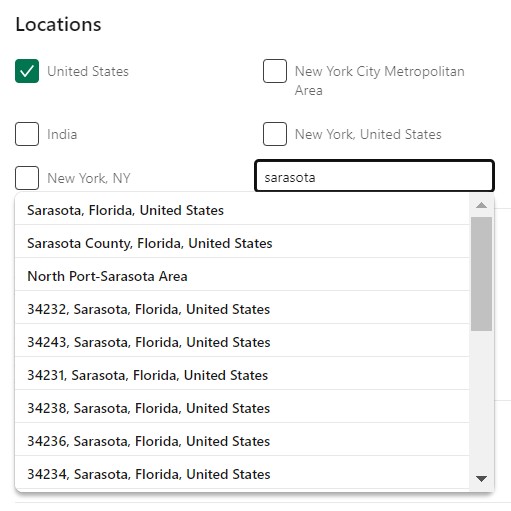
Start with People. Click All Filters and scroll down to Location.
Refine the search by Location by drilling down with country or metro area, or type in a specific city or town by opening the Change Location button for a data field to type into, as I did for Sarasota (in harm’s way from Hurricane Milton, in western Florida.
And as you can see the next steps to refine that search are quite granular, down to postal code (what we call zip codes).
So off I went reminding myself of people I had not already heard from on LinkedIn or Facebook, to see how they did.
They were pleased to report no damage and their relief that this is over. I am pleased they are unharmed.
Isn’t part of being a good human exemplifying concern we would want others to have for us in another situation? I am just using an easy tool given to me to further my relationships with them for altruistic purposes.