
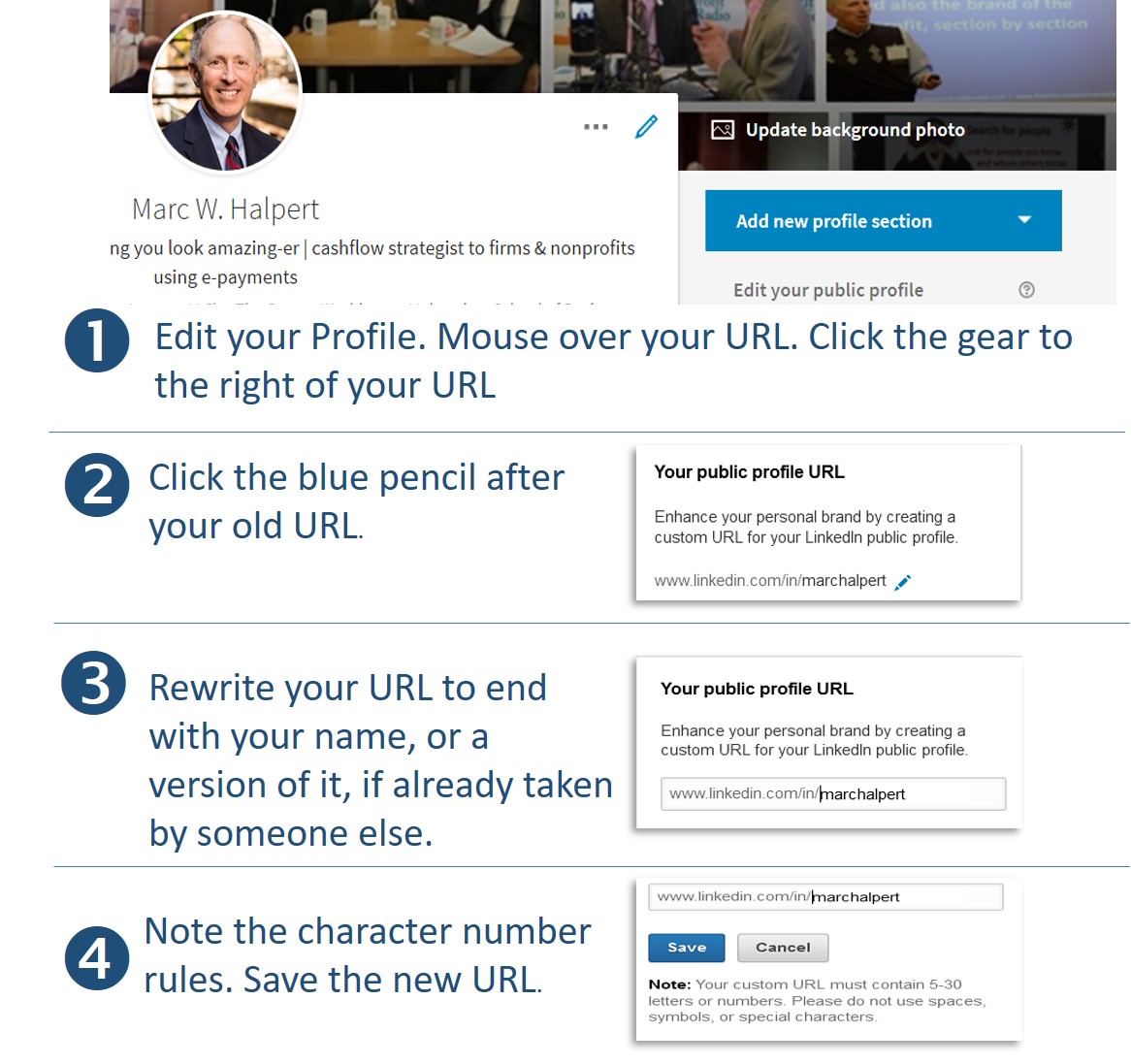
Graphics are in order to demonstrate this one-time task that makes you look so much more accomplished and detail-oriented to casual readers of your profile.
Follow these 4 steps personalize your URL. Keep reading below for places to use it.
Now use it:
- Next time you reprint your business cards, include it there!
- Add to your email signature.
- Marketing materials, proposals, slide decks, handouts, articles, etc.
- On your resume / bio / CV too.
Mine is https://www.linkedin.com/in/marchalpert. Your name by itself may not be available if taken by someone else previously.
Be careful what you ultimately choose; it’s yours for life.
Beware using a middle initial as it is hard to differentiate form a different last name (for example, in https://www.linkedin.com/in/marcwhalpert: is my last name halpert or whalpert?)
Consider adding a dash or underscore between your first name and last name, or end it with a number after your name to be unique. Or “cpa” or “esq” as the case may be.
Now you know. Just do it please?