



A message came from a long-time colleague:
“How can I change my status on LinkedIn to “Retired” (blogmaster’s note: or to say anything you want) without LinkedIn sending out a message to my 1,000+ contacts? I retired several years ago so its old news and I don’t need to hear back from numerous people.“
Yes, an often-asked question, and one worthy of a response here to keep you from letting everyone know about small, or large, changes in your career experience, and you control it.
Make your changes to your Experience section, even correct typos (oh no!) and just before you click “share” to post the changes, which normally would be seen by all your connections, decide if they really need to know about this, or if you want to ease it onto your profile without fanfare. And manipulate the rocker switch at the top of the edit page:

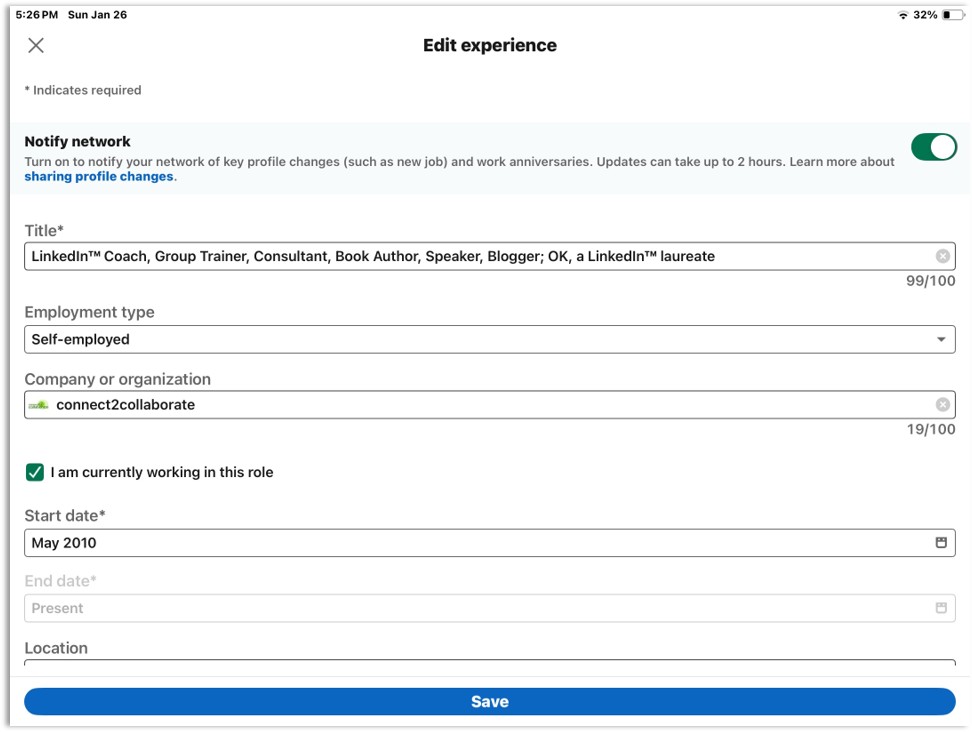
BTW, the same process can be performed to changes you make only to job changes, education changes, and work anniversaries. None of the other sections.
More how-to instruction can be found on LinkedIn’s Help Center at https://www.linkedin.com/help/linkedin/answer/a529062.
So be in control of your brand marketing changes, which I am sure you want to be, from a LinkedIn sense.